Amenoke
1.1.2-INTERVAL
Confidence Interval Node & Critical Bug Fixes
---
## Preview Environment System
Every branch automatically gets a live preview at `https://amenoke.ru/preview/[branch-name]/amenodes.html` for 10 minutes after the last commit.
### How it works
The GitHub Actions workflow:
- **Creates preview** when a new branch is created (except main/master)
- **Updates preview** on every push to any branch (except main/master)
- **Auto-cleans** previews after 10 minutes of inactivity
- Validates JavaScript syntax and HTML structure before deployment
- Shows preview URL in GitHub Actions logs and summary
### Preview URL format
```
https://amenoke.ru/preview/feature-branch-name/amenodes.html
```
Branch names with slashes (`feature/new-feature`) become `feature-new-feature`
### Preview Lifecycle
```
Branch created → Preview deployed (lives for 10 minutes)
↓
Commit after 5 min → Timer resets (lives another 10 min)
↓
Commit after 3 min → Timer resets (lives another 10 min)
↓
No activity for 10 min → Preview AUTOMATICALLY DELETED 🗑️
```
### What gets deployed
The workflow mirrors the entire repository except:
- `.git/` directory
- `.github/` directory
- `preview/` directory (prevents recursive deployment)
- `backups/` directory
### Production deployment
Merges to `main` or `master` automatically deploy to the production site:
```
https://amenoke.ru/amenodes.html
```
### How to get the preview URL
After each push, the preview URL appears:
1. **In GitHub Actions logs** - Look for "✅ Preview updated at:"
2. **In GitHub Summary** - At the bottom of the workflow run page
3. **In deployment artifacts** - Saved as `.deploy_time` and `.commit_sha` on server
### Testing previews locally before pushing
```bash
# Create and switch to a new branch
git checkout -b feature/your-feature
# Run validation locally
for file in $(find . -name "*.js" -type f); do node -c "$file" || exit 1; done
grep -q "" amenodes.html
# Push to trigger preview deployment
git push -u origin feature/your-feature
# Preview URL will be shown in GitHub Actions
```
### Manual cleanup (if needed)
If you want to immediately remove a preview without waiting 10 minutes:
```bash
# Connect via SFTP
sftp your-username@amenoke.ru
# Navigate to preview directory
cd /var/www/html/preview/
# Remove specific preview
rm -rf feature-branch-name/
# Or remove all old previews manually
find . -type d -name ".deploy_time" -mmin +10 -exec rm -rf {} \;
```
### Troubleshooting
**Preview not appearing?**
- Check if branch name is `main` or `master` (previews disabled for production branches)
- Verify GitHub Actions ran successfully (check Actions tab)
- Ensure there's an `amenodes.html` file in your repository
**404 error on preview URL?**
- Wait 1-2 minutes for deployment to complete
- Check that you're using the correct branch name in URL
- Verify the branch had activity in the last 10 minutes
**Server running out of space?**
- Automatic cleanup runs every 10 minutes via cron job
- Inactive previews are removed automatically
- Maximum concurrent previews = number of recently active branches
---
## Introduction
AMNDS is a node-based visual programming language developed in JavaScript for data analysis and work, replacing cumbersome Excel spreadsheets with a large set of mathematical tools.
---
## Tools under development
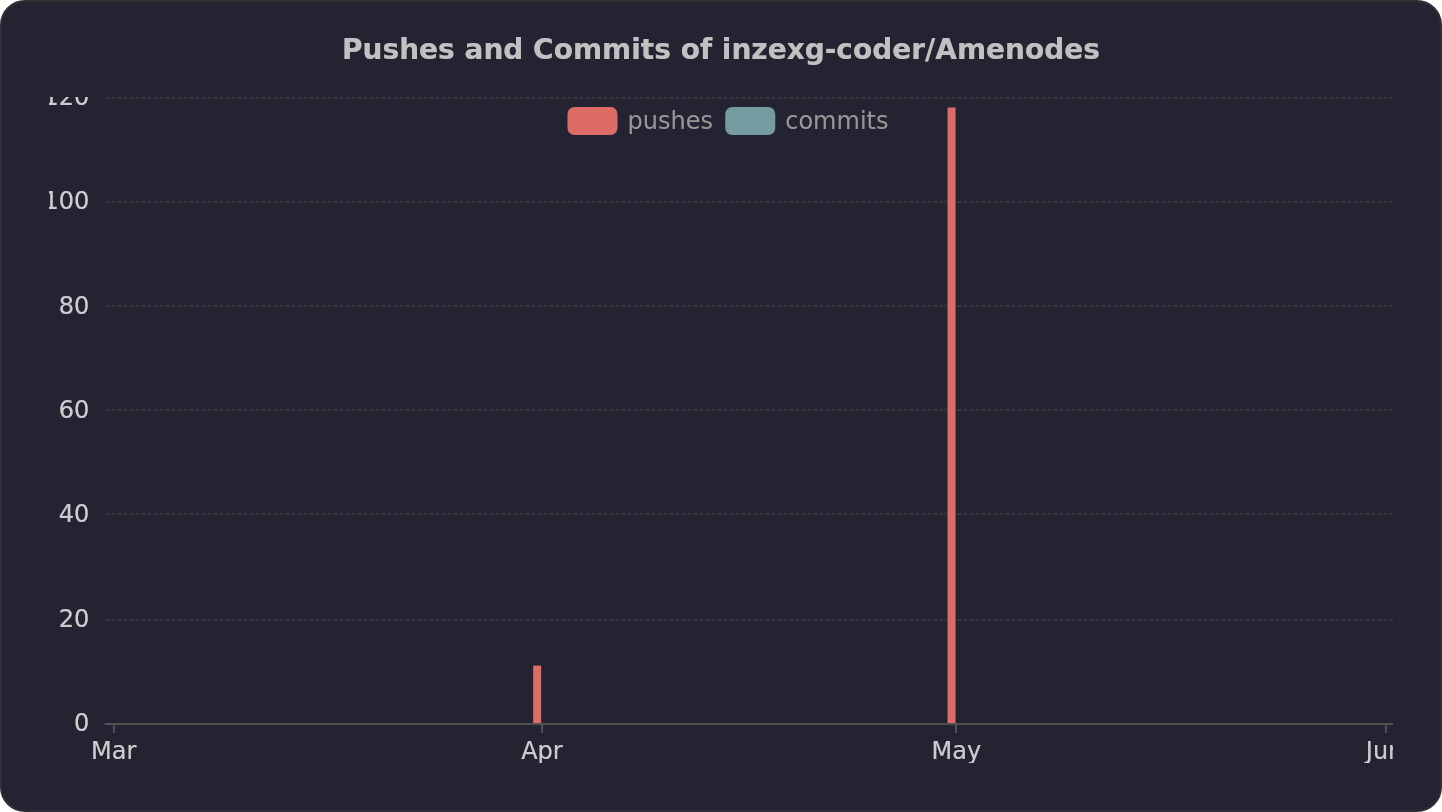
See Wikipedia update statistics and problem resolutions in the following graphs:
 ---
## Amenoke stats
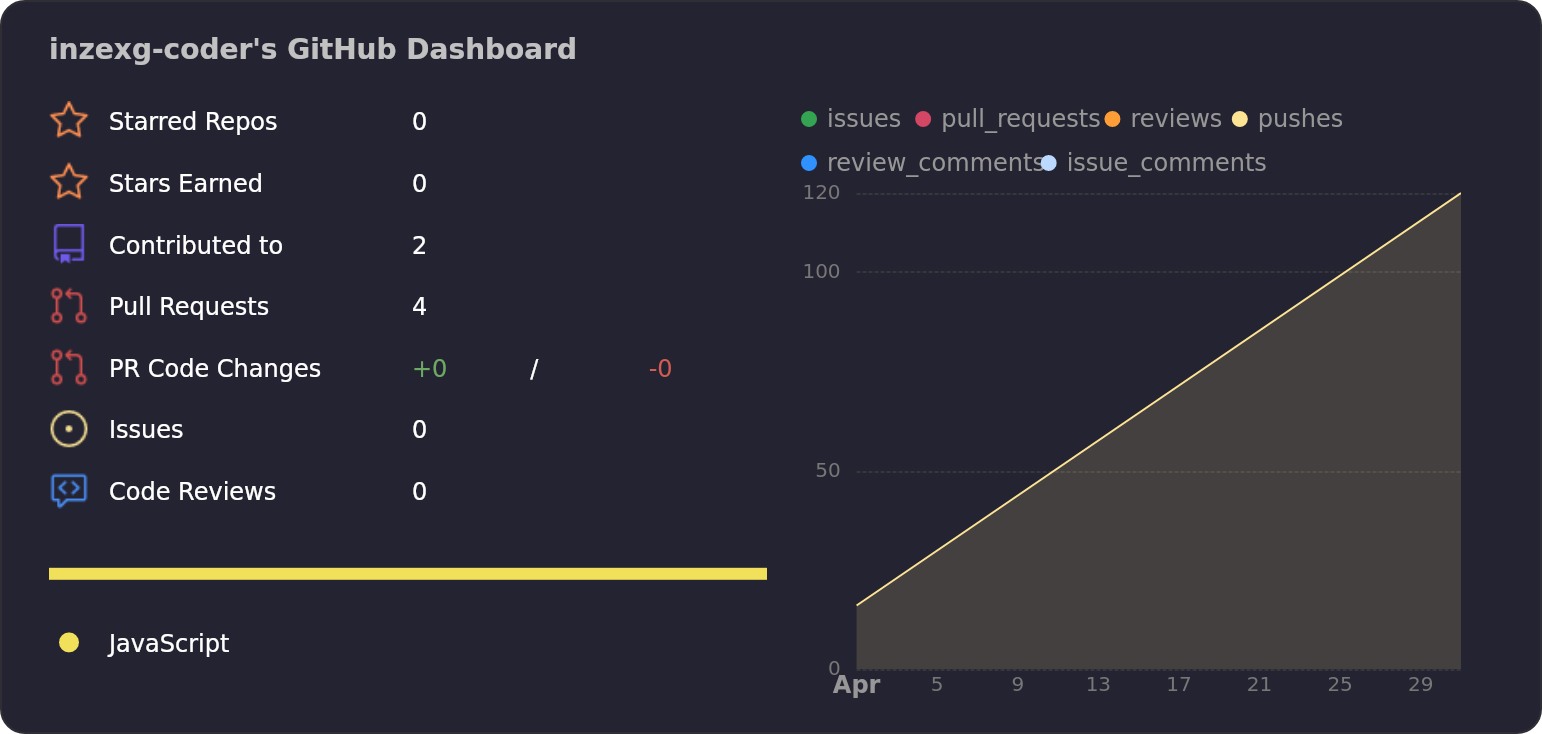
My latest actions on the GitHub page, somehow related to the project or others:
---
## Amenoke stats
My latest actions on the GitHub page, somehow related to the project or others:
 ---
## Developer Documentation
### Project Architecture
The codebase is modularized into ES6 classes organized by responsibility. Below is the complete directory structure:
```
root/
├── amenodes.html # Main application entry point
├── src/
│ ├── main.js # Application entry point, orchestrates all modules
│ ├── core/
│ │ ├── Graph.js # Core graph data structure (nodes, edges, evaluation)
│ │ ├── Node.js # Abstract base class for all node types
│ │ ├── Edge.js # Edge/connection model
│ │ ├── History.js # Undo/redo with localStorage autosave
│ │ └── DataType.js # Type system for connection validation
│ ├── nodes/
│ │ ├── NumberNode.js # Single numeric value node
│ │ ├── ConstantNode.js # Constant value node with visual display
│ │ ├── GroupNode.js # Multi-value container node
│ │ ├── CalcNode.js # Calculation node (div3, div_sqrt12, sqrt_sum_sq)
│ │ ├── OutputNode.js # Results display node with table view
│ │ ├── MapNode.js # Value mapping/transformation node
│ │ └── NodeFactory.js # Factory for creating nodes with localized titles
│ ├── renderer/
│ │ ├── Viewport.js # Pan/zoom viewport controller
│ │ └── DomRenderer.js # DOM manipulation, edge rendering, drag handling
│ ├── ui/
│ │ ├── EditableTitle.js # Inline editable title component
│ │ ├── OptimizationPanel.js # Performance tuning panel UI with benchmarking
│ │ ├── ContextMenu.js # Right-click context menu for nodes
│ │ ├── CustomModal.js # Custom modal dialogs
│ │ └── LanguageSwitcher.js # Language toggle button with dropdown menu
│ ├── i18n/
│ │ ├── LanguageManager.js # Core i18n manager with subscription system
│ │ └── locales/
│ │ ├── ru.js # Russian translations
│ │ └── en.js # English translations
│ ├── services/
│ │ ├── BenchmarkService.js # Performance benchmarking for optimizations
│ │ ├── PersistenceService.js # Save/load to localStorage and files
│ │ └── EventBus.js # Event pub/sub system
│ ├── utils/
│ │ ├── SymbolMapper.js # Greek letter and math symbol substitution
│ │ └── FPSCounter.js # Real-time FPS measurement utility
│ └── config/
│ └── Optimizations.js # Performance optimization definitions
└── styles/
└── main.css # All application styles
```
---
## Class Responsibility Matrix
| Class | Path | Purpose | Key Methods |
|-------|------|---------|--------------|
| `Graph` | `core/Graph.js` | Manages nodes, edges, dependency resolution | `addNode()`, `addEdge()`, `removeNode()`, `reevaluateAll()` |
| `Node` | `core/Node.js` | Abstract base class with translation support | `createBaseDiv()`, `getLocalizedTitle()`, `toJSON()` |
| `NumberNode` | `nodes/NumberNode.js` | Single numeric input/output | `getValue()`, `createDOM()` |
| `ConstantNode` | `nodes/ConstantNode.js` | Constant value with inline editing | `getValue()`, `createDOM()` |
| `GroupNode` | `nodes/GroupNode.js` | Array of named numeric values | `getValue()`, `createDOM()` |
| `CalcNode` | `nodes/CalcNode.js` | Mathematical operations | `getValue()`, `createDOM()` |
| `OutputNode` | `nodes/OutputNode.js` | Results display in table format | `getValue()`, `createDOM()` |
| `MapNode` | `nodes/MapNode.js` | X→Y value mapping | `getValue()`, `getUnmapped()`, `createDOM()` |
| `NodeFactory` | `nodes/NodeFactory.js` | Node creation with localization | `createNode()`, `create*At()` methods |
| `Edge` | `core/Edge.js` | Connection between ports | `toJSON()` |
| `DataType` | `core/DataType.js` | Type validation for connections | `canConnect()`, `getNodeType()` |
| `History` | `core/History.js` | Undo/redo with autosave | `save()`, `undo()`, `redo()`, `autoSave()` |
| `Viewport` | `renderer/Viewport.js` | Camera control (pan with right mouse) | `attach()`, `update()`, `getOffset()` |
| `DomRenderer` | `renderer/DomRenderer.js` | Node DOM and edge SVG rendering | `render()`, `addHandles()`, `setVirtual()` |
| `EdgeRenderer` | `renderer/EdgeRenderer.js` | SVG edge rendering with arrows | `renderEdges()`, `getBorderPoint()` |
| `EditableTitle` | `ui/EditableTitle.js` | Click-to-edit title with symbols | `startEdit()`, `finish()`, `getElement()` |
| `OptimizationPanel` | `ui/OptimizationPanel.js` | Performance settings with benchmarking | `buildPanel()`, `apply()`, `updateGains()` |
| `ContextMenu` | `ui/ContextMenu.js` | Right-click context menu | `show()`, `close()` |
| `CustomModal` | `ui/CustomModal.js` | Custom modal dialogs | `alert()`, `confirm()`, `prompt()` |
| `LanguageSwitcher` | `ui/LanguageSwitcher.js` | Language toggle dropdown | `init()`, `toggleMenu()` |
| `LanguageManager` | `i18n/LanguageManager.js` | Core i18n with subscription | `t()`, `setLanguage()`, `subscribe()` |
| `BenchmarkService` | `services/BenchmarkService.js` | Performance benchmarking | `runBenchmark()`, `captureState()` |
| `PersistenceService` | `services/PersistenceService.js` | Save/load functionality | `saveToStorage()`, `exportToFile()` |
| `EventBus` | `services/EventBus.js` | Event pub/sub system | `on()`, `off()`, `emit()` |
| `SymbolMapper` | `utils/SymbolMapper.js` | Symbol substitution | `replaceSymbols()` |
| `FPSCounter` | `utils/FPSCounter.js` | FPS monitoring | `start()`, `measure()` |
| `OPTIMIZATIONS` | `config/Optimizations.js` | Optimization descriptors | None |
---
## How to Use the Classes for Developers
### Core Graph Management
```javascript
import { Graph } from './core/Graph.js';
import { NumberNode } from './nodes/NumberNode.js';
import { OutputNode } from './nodes/OutputNode.js';
const graph = new Graph();
const numNode = new NumberNode(null, 100, 100, "My Number", 42);
const outNode = new OutputNode(null, 400, 100, "Output", []);
graph.addNode(numNode);
graph.addNode(outNode);
graph.addEdge(numNode.id, outNode.id);
graph.reevaluateAll();
graph.updateAllOutputs();
```
### Creating Nodes with Factory (Recommended)
```javascript
import { NodeFactory } from './nodes/NodeFactory.js';
const numberNode = NodeFactory.createNumberAt(200, 150, 100);
const constantNode = NodeFactory.createConstantAt(200, 250, 3.14159);
const groupNode = NodeFactory.createGroupAt(200, 350);
const calcNode = NodeFactory.createCalcAt(500, 150, 'div3', 'Measurement Error');
const outputNode = NodeFactory.createOutputAt(500, 350);
const mapNode = NodeFactory.createMapAt(500, 250);
graph.addNode(numberNode);
```
### Using the Type System
```javascript
import { typeSystem, DataType } from './core/DataType.js';
const canConnect = typeSystem.canConnect(
DataType.NUM, // source type
'number', // source node type
DataType.AUTO, // target type
'output' // target node type
);
const nodeType = typeSystem.getNodeType(someNode);
```
### Undo/Redo with History
```javascript
import { History } from './core/History.js';
const history = new History(graph, 50);
history.save();
history.undo();
history.redo();
history.autoSave();
```
### Rendering with Viewport and DomRenderer
```javascript
import { Viewport } from './renderer/Viewport.js';
import { DomRenderer } from './renderer/DomRenderer.js';
const viewport = new Viewport(viewportElement, canvasContainer);
const renderer = new DomRenderer(graph, nodesLayer, viewportElement, eventBus);
renderer.setViewport(viewport);
renderer.setHistory(history);
renderer.render();
renderer.setVirtual(true); // Enable virtualization for performance
```
### Internationalization (i18n)
```javascript
import { i18n, t } from './i18n/LanguageManager.js';
const lang = i18n.getCurrentLanguage(); // 'en' or 'ru'
const translated = t('common.ok'); // 'OK' or 'ОК'
i18n.setLanguage('ru');
const unsubscribe = i18n.subscribe((lang, translations) => {
console.log(`Language changed to ${lang}`);
this.updateUI();
});
unsubscribe();
```
### Adding New Translations
1. Add keys to both `src/i18n/locales/ru.js` and `src/i18n/locales/en.js`
2. Use nested object structure: `category.subcategory.key`
3. Use `t('category.subcategory.key')` in components
```javascript
// locales/en.js
export const en = {
myFeature: {
buttonText: 'Click Me',
description: 'This is a {color} button'
}
};
// In component
const text = t('myFeature.buttonText');
const desc = t('myFeature.description', { color: 'red' });
```
### Performance Benchmarking
```javascript
import { BenchmarkService } from './services/BenchmarkService.js';
import { OPTIMIZATIONS } from './config/Optimizations.js';
const benchmarkService = new BenchmarkService(graph, fpsCounter, OPTIMIZATIONS);
const result = await benchmarkService.runBenchmark();
console.log(`Baseline FPS: ${result.baseline}`);
console.log(`Gains: ${result.gains}`);
```
### Save/Load Functionality
```javascript
import { PersistenceService } from './services/PersistenceService.js';
const persistence = new PersistenceService(graph);
persistence.saveToStorage(viewport, currentZoom, qualityValue);
const saved = persistence.loadFromStorage();
persistence.exportToFile();
const success = await persistence.importFromFile(file);
```
### Custom Modal Dialogs
```javascript
import { modal } from './ui/CustomModal.js';
await modal.alert('Something happened');
const confirmed = await modal.confirm('Are you sure?');
const value = await modal.prompt('Enter value:', 'default');
```
### Event Bus
```javascript
import { EventBus } from './services/EventBus.js';
const bus = new EventBus();
bus.on('node:created', (data) => console.log(data.nodeId));
bus.emit('node:created', { nodeId: 123 });
```
---
## Versioning System
Amenoke follows a structured versioning scheme combining semantic versioning, pre-release labels, and change-type codes.
### Format
`MAJOR.MINOR.PATCH[-PRERELEASE][-CODETYPE]`
| Component | Meaning | Example |
|-----------|---------|---------|
| **MAJOR** | Breaking changes (incompatible API) | `2.0.0` |
| **MINOR** | Backward-compatible new features | `1.2.0` |
| **PATCH** | Backward-compatible bug fixes | `1.0.1` |
| **PRERELEASE** | Development phase: `-alphaN`, `-betaN`, `-rcN` | `-rc1` |
| **CODETYPE** | Nature of changes: `API`, `TYP`, `SEC`, `OPT`, `DEP`, `REM`, `SYN`, `I18N` | `-I18N` |
### Change Type Codes
| Code | Meaning | When to Use |
|------|---------|--------------|
| `API` | Public API changes | After modifying `Graph.js` public interface |
| `TYP` | Type system enhancements | After changes to `DataType.js` or `Node.js` |
| `SEC` | Security fixes | After patching vulnerabilities |
| `OPT` | Performance optimizations | After changes in `Optimizations.js` or renderer |
| `DEP` | Deprecations | After marking old features as deprecated |
| `REM` | Removed features | After deleting old functionality |
| `SYN` | Syntax/parser changes | After modifying node connection rules |
| `I18N` | Internationalization | After adding/updating language support |
---
## Git Workflow for Contributors
### Repository Setup
```bash
git clone https://github.com/inzexg-coder/Amenodes.git
cd Amenodes
git checkout -b feature/your-feature-name
```
### Commit Convention
| Prefix | Purpose |
|--------|---------|
| `feat:` | New feature or node type |
| `fix:` | Bug fix |
| `refactor:` | Code restructuring |
| `style:` | CSS/visual changes |
| `docs:` | Documentation updates |
| `perf:` | Performance optimization |
| `i18n:` | Translation changes |
| `chore:` | Build/config changes |
### Before Committing
1. Test all existing node types
2. Run manual FPS benchmark
3. Ensure no regression in undo/redo
4. Verify import/export compatibility
5. Test language switching
### Pull Request Process
1. Push to your feature branch
2. Open PR against `main` branch
3. A preview deployment will automatically appear as a comment
4. Wait for validation checks (syntax, HTML)
5. Request review from project maintainer
6. After approval, squash and merge
---
## Contact & Support
---
## Developer Documentation
### Project Architecture
The codebase is modularized into ES6 classes organized by responsibility. Below is the complete directory structure:
```
root/
├── amenodes.html # Main application entry point
├── src/
│ ├── main.js # Application entry point, orchestrates all modules
│ ├── core/
│ │ ├── Graph.js # Core graph data structure (nodes, edges, evaluation)
│ │ ├── Node.js # Abstract base class for all node types
│ │ ├── Edge.js # Edge/connection model
│ │ ├── History.js # Undo/redo with localStorage autosave
│ │ └── DataType.js # Type system for connection validation
│ ├── nodes/
│ │ ├── NumberNode.js # Single numeric value node
│ │ ├── ConstantNode.js # Constant value node with visual display
│ │ ├── GroupNode.js # Multi-value container node
│ │ ├── CalcNode.js # Calculation node (div3, div_sqrt12, sqrt_sum_sq)
│ │ ├── OutputNode.js # Results display node with table view
│ │ ├── MapNode.js # Value mapping/transformation node
│ │ └── NodeFactory.js # Factory for creating nodes with localized titles
│ ├── renderer/
│ │ ├── Viewport.js # Pan/zoom viewport controller
│ │ └── DomRenderer.js # DOM manipulation, edge rendering, drag handling
│ ├── ui/
│ │ ├── EditableTitle.js # Inline editable title component
│ │ ├── OptimizationPanel.js # Performance tuning panel UI with benchmarking
│ │ ├── ContextMenu.js # Right-click context menu for nodes
│ │ ├── CustomModal.js # Custom modal dialogs
│ │ └── LanguageSwitcher.js # Language toggle button with dropdown menu
│ ├── i18n/
│ │ ├── LanguageManager.js # Core i18n manager with subscription system
│ │ └── locales/
│ │ ├── ru.js # Russian translations
│ │ └── en.js # English translations
│ ├── services/
│ │ ├── BenchmarkService.js # Performance benchmarking for optimizations
│ │ ├── PersistenceService.js # Save/load to localStorage and files
│ │ └── EventBus.js # Event pub/sub system
│ ├── utils/
│ │ ├── SymbolMapper.js # Greek letter and math symbol substitution
│ │ └── FPSCounter.js # Real-time FPS measurement utility
│ └── config/
│ └── Optimizations.js # Performance optimization definitions
└── styles/
└── main.css # All application styles
```
---
## Class Responsibility Matrix
| Class | Path | Purpose | Key Methods |
|-------|------|---------|--------------|
| `Graph` | `core/Graph.js` | Manages nodes, edges, dependency resolution | `addNode()`, `addEdge()`, `removeNode()`, `reevaluateAll()` |
| `Node` | `core/Node.js` | Abstract base class with translation support | `createBaseDiv()`, `getLocalizedTitle()`, `toJSON()` |
| `NumberNode` | `nodes/NumberNode.js` | Single numeric input/output | `getValue()`, `createDOM()` |
| `ConstantNode` | `nodes/ConstantNode.js` | Constant value with inline editing | `getValue()`, `createDOM()` |
| `GroupNode` | `nodes/GroupNode.js` | Array of named numeric values | `getValue()`, `createDOM()` |
| `CalcNode` | `nodes/CalcNode.js` | Mathematical operations | `getValue()`, `createDOM()` |
| `OutputNode` | `nodes/OutputNode.js` | Results display in table format | `getValue()`, `createDOM()` |
| `MapNode` | `nodes/MapNode.js` | X→Y value mapping | `getValue()`, `getUnmapped()`, `createDOM()` |
| `NodeFactory` | `nodes/NodeFactory.js` | Node creation with localization | `createNode()`, `create*At()` methods |
| `Edge` | `core/Edge.js` | Connection between ports | `toJSON()` |
| `DataType` | `core/DataType.js` | Type validation for connections | `canConnect()`, `getNodeType()` |
| `History` | `core/History.js` | Undo/redo with autosave | `save()`, `undo()`, `redo()`, `autoSave()` |
| `Viewport` | `renderer/Viewport.js` | Camera control (pan with right mouse) | `attach()`, `update()`, `getOffset()` |
| `DomRenderer` | `renderer/DomRenderer.js` | Node DOM and edge SVG rendering | `render()`, `addHandles()`, `setVirtual()` |
| `EdgeRenderer` | `renderer/EdgeRenderer.js` | SVG edge rendering with arrows | `renderEdges()`, `getBorderPoint()` |
| `EditableTitle` | `ui/EditableTitle.js` | Click-to-edit title with symbols | `startEdit()`, `finish()`, `getElement()` |
| `OptimizationPanel` | `ui/OptimizationPanel.js` | Performance settings with benchmarking | `buildPanel()`, `apply()`, `updateGains()` |
| `ContextMenu` | `ui/ContextMenu.js` | Right-click context menu | `show()`, `close()` |
| `CustomModal` | `ui/CustomModal.js` | Custom modal dialogs | `alert()`, `confirm()`, `prompt()` |
| `LanguageSwitcher` | `ui/LanguageSwitcher.js` | Language toggle dropdown | `init()`, `toggleMenu()` |
| `LanguageManager` | `i18n/LanguageManager.js` | Core i18n with subscription | `t()`, `setLanguage()`, `subscribe()` |
| `BenchmarkService` | `services/BenchmarkService.js` | Performance benchmarking | `runBenchmark()`, `captureState()` |
| `PersistenceService` | `services/PersistenceService.js` | Save/load functionality | `saveToStorage()`, `exportToFile()` |
| `EventBus` | `services/EventBus.js` | Event pub/sub system | `on()`, `off()`, `emit()` |
| `SymbolMapper` | `utils/SymbolMapper.js` | Symbol substitution | `replaceSymbols()` |
| `FPSCounter` | `utils/FPSCounter.js` | FPS monitoring | `start()`, `measure()` |
| `OPTIMIZATIONS` | `config/Optimizations.js` | Optimization descriptors | None |
---
## How to Use the Classes for Developers
### Core Graph Management
```javascript
import { Graph } from './core/Graph.js';
import { NumberNode } from './nodes/NumberNode.js';
import { OutputNode } from './nodes/OutputNode.js';
const graph = new Graph();
const numNode = new NumberNode(null, 100, 100, "My Number", 42);
const outNode = new OutputNode(null, 400, 100, "Output", []);
graph.addNode(numNode);
graph.addNode(outNode);
graph.addEdge(numNode.id, outNode.id);
graph.reevaluateAll();
graph.updateAllOutputs();
```
### Creating Nodes with Factory (Recommended)
```javascript
import { NodeFactory } from './nodes/NodeFactory.js';
const numberNode = NodeFactory.createNumberAt(200, 150, 100);
const constantNode = NodeFactory.createConstantAt(200, 250, 3.14159);
const groupNode = NodeFactory.createGroupAt(200, 350);
const calcNode = NodeFactory.createCalcAt(500, 150, 'div3', 'Measurement Error');
const outputNode = NodeFactory.createOutputAt(500, 350);
const mapNode = NodeFactory.createMapAt(500, 250);
graph.addNode(numberNode);
```
### Using the Type System
```javascript
import { typeSystem, DataType } from './core/DataType.js';
const canConnect = typeSystem.canConnect(
DataType.NUM, // source type
'number', // source node type
DataType.AUTO, // target type
'output' // target node type
);
const nodeType = typeSystem.getNodeType(someNode);
```
### Undo/Redo with History
```javascript
import { History } from './core/History.js';
const history = new History(graph, 50);
history.save();
history.undo();
history.redo();
history.autoSave();
```
### Rendering with Viewport and DomRenderer
```javascript
import { Viewport } from './renderer/Viewport.js';
import { DomRenderer } from './renderer/DomRenderer.js';
const viewport = new Viewport(viewportElement, canvasContainer);
const renderer = new DomRenderer(graph, nodesLayer, viewportElement, eventBus);
renderer.setViewport(viewport);
renderer.setHistory(history);
renderer.render();
renderer.setVirtual(true); // Enable virtualization for performance
```
### Internationalization (i18n)
```javascript
import { i18n, t } from './i18n/LanguageManager.js';
const lang = i18n.getCurrentLanguage(); // 'en' or 'ru'
const translated = t('common.ok'); // 'OK' or 'ОК'
i18n.setLanguage('ru');
const unsubscribe = i18n.subscribe((lang, translations) => {
console.log(`Language changed to ${lang}`);
this.updateUI();
});
unsubscribe();
```
### Adding New Translations
1. Add keys to both `src/i18n/locales/ru.js` and `src/i18n/locales/en.js`
2. Use nested object structure: `category.subcategory.key`
3. Use `t('category.subcategory.key')` in components
```javascript
// locales/en.js
export const en = {
myFeature: {
buttonText: 'Click Me',
description: 'This is a {color} button'
}
};
// In component
const text = t('myFeature.buttonText');
const desc = t('myFeature.description', { color: 'red' });
```
### Performance Benchmarking
```javascript
import { BenchmarkService } from './services/BenchmarkService.js';
import { OPTIMIZATIONS } from './config/Optimizations.js';
const benchmarkService = new BenchmarkService(graph, fpsCounter, OPTIMIZATIONS);
const result = await benchmarkService.runBenchmark();
console.log(`Baseline FPS: ${result.baseline}`);
console.log(`Gains: ${result.gains}`);
```
### Save/Load Functionality
```javascript
import { PersistenceService } from './services/PersistenceService.js';
const persistence = new PersistenceService(graph);
persistence.saveToStorage(viewport, currentZoom, qualityValue);
const saved = persistence.loadFromStorage();
persistence.exportToFile();
const success = await persistence.importFromFile(file);
```
### Custom Modal Dialogs
```javascript
import { modal } from './ui/CustomModal.js';
await modal.alert('Something happened');
const confirmed = await modal.confirm('Are you sure?');
const value = await modal.prompt('Enter value:', 'default');
```
### Event Bus
```javascript
import { EventBus } from './services/EventBus.js';
const bus = new EventBus();
bus.on('node:created', (data) => console.log(data.nodeId));
bus.emit('node:created', { nodeId: 123 });
```
---
## Versioning System
Amenoke follows a structured versioning scheme combining semantic versioning, pre-release labels, and change-type codes.
### Format
`MAJOR.MINOR.PATCH[-PRERELEASE][-CODETYPE]`
| Component | Meaning | Example |
|-----------|---------|---------|
| **MAJOR** | Breaking changes (incompatible API) | `2.0.0` |
| **MINOR** | Backward-compatible new features | `1.2.0` |
| **PATCH** | Backward-compatible bug fixes | `1.0.1` |
| **PRERELEASE** | Development phase: `-alphaN`, `-betaN`, `-rcN` | `-rc1` |
| **CODETYPE** | Nature of changes: `API`, `TYP`, `SEC`, `OPT`, `DEP`, `REM`, `SYN`, `I18N` | `-I18N` |
### Change Type Codes
| Code | Meaning | When to Use |
|------|---------|--------------|
| `API` | Public API changes | After modifying `Graph.js` public interface |
| `TYP` | Type system enhancements | After changes to `DataType.js` or `Node.js` |
| `SEC` | Security fixes | After patching vulnerabilities |
| `OPT` | Performance optimizations | After changes in `Optimizations.js` or renderer |
| `DEP` | Deprecations | After marking old features as deprecated |
| `REM` | Removed features | After deleting old functionality |
| `SYN` | Syntax/parser changes | After modifying node connection rules |
| `I18N` | Internationalization | After adding/updating language support |
---
## Git Workflow for Contributors
### Repository Setup
```bash
git clone https://github.com/inzexg-coder/Amenodes.git
cd Amenodes
git checkout -b feature/your-feature-name
```
### Commit Convention
| Prefix | Purpose |
|--------|---------|
| `feat:` | New feature or node type |
| `fix:` | Bug fix |
| `refactor:` | Code restructuring |
| `style:` | CSS/visual changes |
| `docs:` | Documentation updates |
| `perf:` | Performance optimization |
| `i18n:` | Translation changes |
| `chore:` | Build/config changes |
### Before Committing
1. Test all existing node types
2. Run manual FPS benchmark
3. Ensure no regression in undo/redo
4. Verify import/export compatibility
5. Test language switching
### Pull Request Process
1. Push to your feature branch
2. Open PR against `main` branch
3. A preview deployment will automatically appear as a comment
4. Wait for validation checks (syntax, HTML)
5. Request review from project maintainer
6. After approval, squash and merge
---
## Contact & Support


 ---
**Repository:** https://github.com/inzexg-coder/Amenodes
**Live Demo:** https://amenoke.ru/amenodes.html
**Wiki:** https://github.com/inzexg-coder/Amenodes/wiki
---
**Repository:** https://github.com/inzexg-coder/Amenodes
**Live Demo:** https://amenoke.ru/amenodes.html
**Wiki:** https://github.com/inzexg-coder/Amenodes/wiki